
The Nigeria Revenue Service (NRS) has officially transitioned from TaxPro Max to Rev360. This is not just a User Interface update; it is a “Tax 3.0” automation department project (Version 1.0) designed for a unified national data framework. It integrates directly with the CAC and NIMC to ensure every taxpayer’s data is verified in real-time.
How to Login to Rev360: Step-by-Step Guide
The Rev360 platform uses a unified authentication process called the NRS Single Sign-On (SSO). This means your login is more secure and connected to all other NRS services.
Step 1: Access the Official Portal
Go to the official self-service URL: selfservice.nrs.gov.ng.
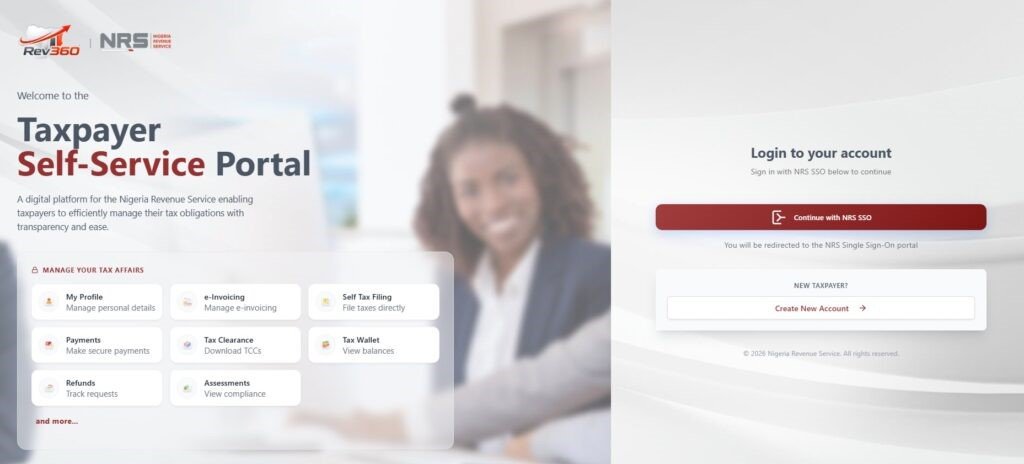
Step 2: Initiate the SSO
On the homepage, do not look for a standard username box immediately. Instead, click the button that says “Continue with NRS SSO.” This is the “gate” to the secure portal.
Step 3: Enter Your Migration Credentials
Username: Check your registered email address.
Password: Enter the temporary password sent to your email during onboarding or migration from TaxPro Max.
Note: Your username and password are sent to your registered email address during onboarding or
migration.
Step 4: The First-Time Access Rule
If this is your first time logging in since the migration, the system will immediately prompt you to change your password.
Tip: Choose a strong password with at least one capital letter, one number, and one special character (like @ or #) to ensure the system accepts it.